Robots can help a student join a lesson from home, handle equipment they can't reach, or practise a task at their own pace. The hard part is choosing a real access problem before buying a machine.
- Telepresence robots can connect remote students to a classroom.
- Assistive arms can help with physical tasks around a lab.
- Software and training matter as much as the robot itself.
Access starts with the barrier
“Accessible education” can mean several different things. A student may need help entering a building, handling tools, seeing a demonstration, speaking during a lesson, or attending class while ill. Each problem points to a different robot, and some need no robot at all.
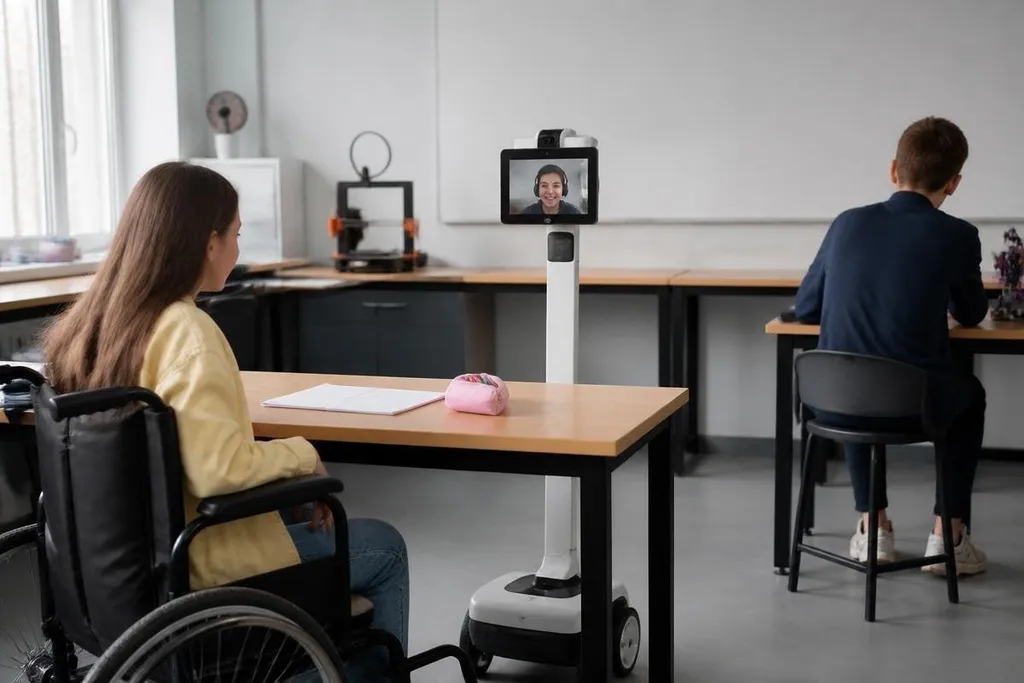
A telepresence robot usually combines a screen, camera, microphone, speaker, and mobile base. The student controls it through a network connection, moves around the classroom, and talks with people nearby. That setup may help a student take part in group work when travel or health makes attendance hard.
The robot doesn't remove every barrier. A slow network can delay speech, a crowded room can block movement, and a teacher may need to place the robot where the student can see the board. Those details belong in the plan before a school signs a purchase order.
Where robots can help
An assistive arm can move an object, hold a camera, or press a button when a student has limited reach or movement. The arm still needs safe limits, a suitable control method, and a teacher who can stop it quickly.
A mobile robot can also carry a camera or sensor through a science activity. Students can inspect a space from a distance and discuss the results with classmates. The educational value comes from the task and the questions around it, not from putting a robot in the room.
Robots may also support practice. A student learning programming can change a robot's movement and see the result. A student studying automation can test a gripper, sensor, or path-planning system. These uses make sense when the robot exposes controls the student can understand rather than hiding every decision behind an app.
The limits schools need to price in
Cost is only one part of access. A school also needs charging space, network access, repairs, software updates, staff training, and a plan for safe storage. If only one teacher knows how to run the system, the program can stop when that teacher is absent.
Privacy needs a written rule. Cameras and microphones may record classrooms, homes, or conversations. Schools should decide what the robot captures, where data goes, who can view it, and when recordings are deleted. A lesson about access should not create a new problem for the student's privacy.
Classroom interaction can also change. Remote students may see the back of heads, miss quiet side conversations, or struggle to enter a group.
Teachers need routines that give the student time to speak and make the robot part of the class without making the student responsible for operating it perfectly.
A classroom trial can look successful while leaving the teacher to solve the hard parts. A report from Robot 24 can place the robot’s task, setup, and human support beside its access claims, giving you facts to weigh before the buying check.
A practical buying check
Before a school or college starts a pilot, check these points:
- Name the barrier: write down the task the student cannot complete and why.
- Test the room: check doors, ramps, tables, network coverage, lighting, and noise.
- Set a human fallback: assign a staff member who can help when the robot stops.
- Limit the data: record only what the lesson needs, with clear deletion rules.
- Measure participation: track attendance, completed tasks, and student feedback.
- Price the full system: include training, repairs, software, storage, and replacement parts.
That checklist separates a useful access project from a hardware display. It also gives staff a way to compare a robot with a cheaper change, such as a camera, adjustable table, remote lesson, or trained classroom aide.
What should happen next
Schools should start with one course, one access barrier, and a short trial. The result to watch is not how smoothly the robot moves; it is whether the student can complete the same learning task with less help or less lost class time.
I'd fund a robot when that result is measurable and the school can maintain it after the pilot. If the machine adds setup work without giving the student more control over learning, choose the simpler tool instead.